The quiet ceiling on AI in support: Knowledge Builder, Knowledge Sources, and the role that keeps them running
Third and last in our deep-dive series after the Progressive Autonomy launch. Progressive Autonomy decides what the AI does with each class of tickets. The copilot shapes what happens when a person is involved. Knowledge is what grounds both — and Knowledge Builder is how it stays current. The piece that quietly caps every AI deployment, and the one Flexivity is built to close.

Over the past month, we’ve walked through Progressive Autonomy — how Flexivity decides what the AI does with each class of tickets — and the agent copilot — how it supports the people who take over when a ticket needs them. Both rely on something more fundamental, and it’s where every AI deployment in customer support quietly succeeds or quietly fails: the knowledge the AI has to work from.
If your knowledge base covers a question, the AI can answer it. If it doesn’t, the AI can’t — or shouldn’t. A grounded AI without the grounding is just a confident guesser. An AI with half-complete knowledge is an AI that handles the easy questions and bounces everything else to your team, which is nowhere near the value proposition anyone bought it for.
This is where most AI deployments plateau. The AI handles the first wave of ticket categories well — the ones your help center documented years ago — and then the ROI curve flattens because the knowledge base doesn’t cover the next wave. There’s no mechanism to find the gaps or close them. The team moves on to other projects. The AI stays stuck at whatever percentage of tickets your original KB could ground.
Knowledge Builder exists to break that plateau. Knowledge Sources widen what counts as knowledge. And a dedicated role — the Knowledge Manager — turns both into an operational practice rather than a one-time project.
Knowledge Sources: Three places answers come from
We covered this capability in detail recently, so briefly: Flexivity grounds answers in three source types, side by side.
Your help desk knowledge base stays where it is — the articles already in Zendesk Help Center or osTicket FAQ become the primary source, cited back to customers in replies.
Website Content connects public documentation sites — product docs, policy pages, knowledge portals — so the AI can answer from pages that already exist on your public web, without copying anything into your help center. Polite crawler, scheduled refreshes, path filters.
Documents are internal reference material — policies, runbooks, product specs — uploaded as PDF, Word, Markdown, or plain text. The AI uses them to answer but never names, cites, or links them in a reply to a customer. Internal grounding, scrubbed of PII, source files discarded after processing.
Everything feeds the same AI. Everything is grounded. Every claim ties to a source.
The point of three source types: your knowledge isn’t all in one place and shouldn’t need to be. For most teams, it never was.
Knowledge Builder: Finding the gaps
Knowledge Sources tell the AI what to answer from. Knowledge Builder tells you what’s missing from them.
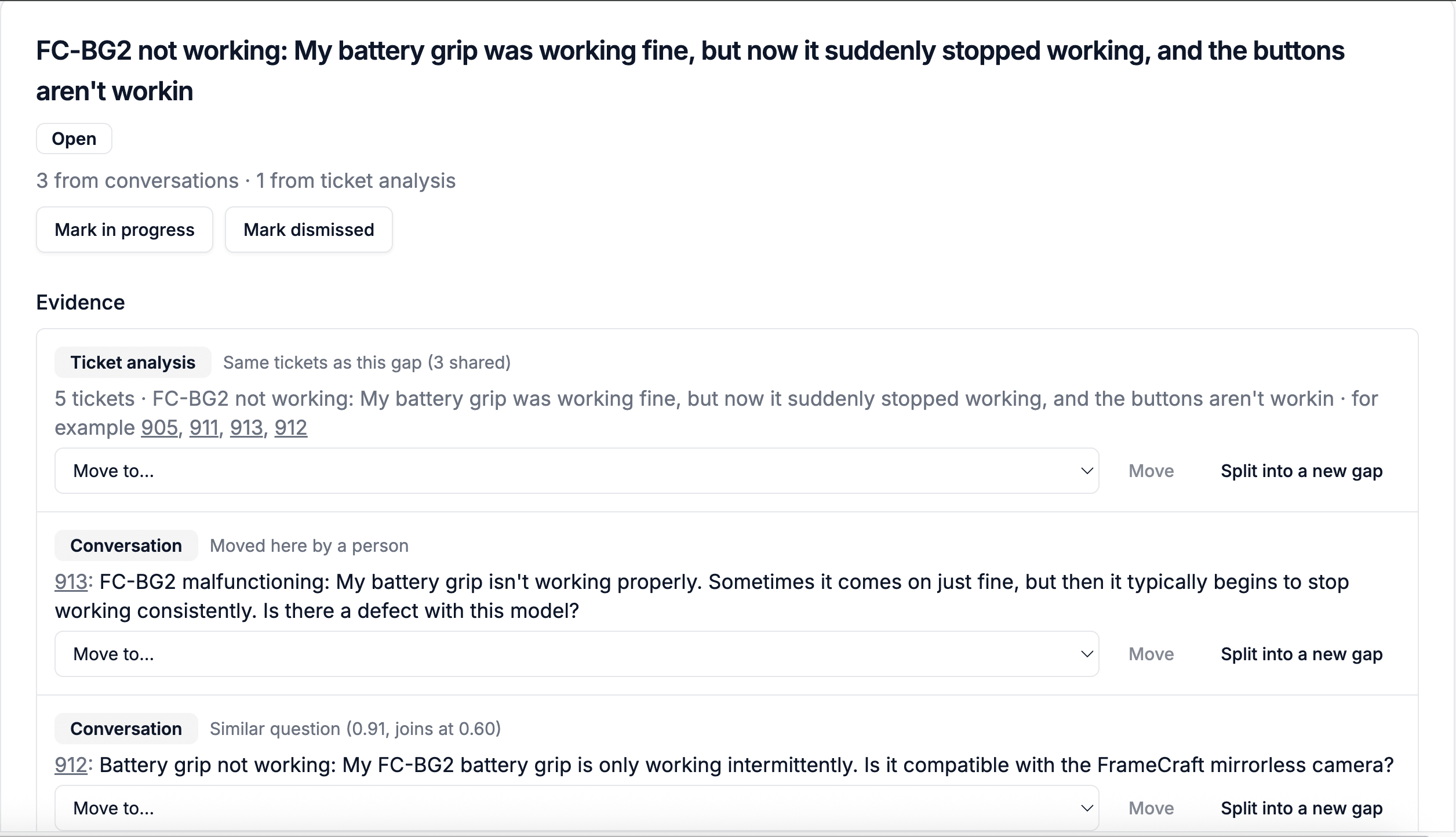
A gap, in Flexivity’s terms, is a question your customers keep asking that your knowledge doesn’t answer. Historically, finding these gaps has required manual effort — someone goes through tickets looking for patterns, or the team notices through accumulated frustration that “we keep getting X question” and eventually writes an article for it. The gaps that get filled are the ones that reach somebody’s attention. The gaps that don’t quietly cap performance.
Knowledge Builder finds them two ways.
Cluster analysis across resolved tickets. On every run, Knowledge Builder groups your resolved tickets into topics and compares each topic to your published articles. A topic that no article covers becomes a candidate — a gap backed by the tickets that document it. Candidates with more tickets are the gaps that generate the most support work; those are the ones to start with.
Handover tracking from unanswered tickets. Newly expanded in Knowledge Builder: when Flexivity hands a ticket to an agent specifically because no knowledge covered the question, that handover is recorded as a gap signal. The AI knew it didn’t know, said so honestly, and escalated. Knowledge Builder now collects these moments directly — the gap doesn’t have to be inferred from resolution clusters; it’s known at the time of handover.
Together, the two detection paths cover different gap types. Cluster analysis finds patterns across tickets your team already resolved, often questions the knowledge base once answered but no longer does accurately, or recurring issues that live in agent memory rather than written form. Handover tracking catches gaps the AI runs into as they happen, in real time, with the specific ticket and conversation that triggered the escalation.
The result is a complete picture of where your knowledge base needs to grow.
From candidate to published article
Every candidate gets a draft, written from the tickets the gap was identified from. Not from generic templates. From the answers your team is already giving — just extracted into a reusable article.
Review the draft. Edit it if you want. Then push:
- To Zendesk — the article goes to your Help Center as an unpublished draft, in the section you choose. Review and publish it in Zendesk.
- To osTicket — the article becomes a new internal FAQ entry in the category you choose. Review before publishing and making public.
Analysis settings per brand let you tune how Knowledge Builder works: minimum topic size for a candidate, topic granularity, noise sensitivity, how close an existing article has to be before the topic counts as covered, article format (knowledge base topic or FAQ), draft wording variability, and custom instructions for how the AI writes. Defaults are reasonable; the dials are there when you need them.
Running an analysis every month works well for most teams. New patterns are caught as your ticket mix changes.
The role that keeps it running
Finding gaps is a mechanism. Keeping a knowledge base current is a job.
Every mature support operation either has a Knowledge Manager — a specific person responsible for the ongoing health of the knowledge base — or has nobody doing the work, in which case the knowledge base gradually diverges from reality. Articles go stale. New products get added without new articles. Agents answer the same questions three times instead of once. The AI’s grounding gets worse, not better, over time.
Flexivity’s answer is to make Knowledge Manager a first-class role in the product, not a hopeful suggestion.
The Knowledge Manager role has explicit, scoped permissions designed for this work:
- Full ability to run Knowledge Builder — start analyses, review candidates, generate drafts, edit them, push to the help desk
- Full ability to configure Knowledge Sources — add or update website content, upload or replace documents, adjust refresh schedules
- Read-only access to the rest of the Admin Console — AI configuration, Procedures, Data Connectors, Users, Billing
The knowledge person can do the knowledge job completely without needing an admin, and without having access to settings outside their scope. For teams where the Knowledge Manager role is filled by a technical writer, a support team lead, or someone from documentation — not a full admin — the scoped permissions matter. Give them the right access, no more and no less.
Having the role in the product changes how the work gets done. “Review this month’s Knowledge Builder candidates” becomes a recurring task owned by a specific person, not a vague team responsibility that falls through the cracks. Over months and years, that discipline compounds — more gaps filled means more tickets the AI can handle reliably, which means more ticket classes you can promote up the Progressive Autonomy ladder, which means more support work the AI handles without human time.
Where this closes the loop
Progressive Autonomy decides what the AI does with each class of tickets. The copilot shapes what happens when a person is involved. Knowledge grounds every answer the AI gives. Knowledge Builder closes the gaps that cap how far up the ladder a class of tickets can go.
Together, they’re the system we introduced at launch — complete, now that this series has walked through each piece.
A class of tickets stuck at Assist because the AI can’t answer them reliably? Look at the gap. If the knowledge isn’t there, Knowledge Builder finds it, drafts it, and the next run of articles closes it. Now that class of tickets can be promoted — maybe to Reply, maybe eventually to Resolve.
That compounding is where AI in customer support actually starts working — not from a bigger model or a tuned prompt, but from a knowledge base that gets better every month and an operational practice that keeps it current.
This is the end of the deep-dive series. If you want to see Knowledge Builder running on your own tickets, book a demo or start a trial.
Documentation: Knowledge Builder and Knowledge Sources.