
Answering a customer’s question is often only the first step. The next step is doing something — looking up an order, issuing a refund, changing an address, cancelling a subscription. Data Connectors give Flexivity’s AI the reach to do both: look things up in your systems to inform an answer, and make changes to those systems when the write mode you’ve set allows. Every lookup is scoped to the customer on the ticket. Every change is checked before and again when it runs.
Lookups and Changes
Every connector call is scoped to the customer identified from your help desk. Nothing the AI writes, nothing the customer types in the conversation, can point a lookup at someone else. In chat, a customer is looked up only when they’re signed in. A charge or invoice belonging to another customer is never returned.
Field-level visibility controls let you decide what the AI sees for each tool — each field of the result is either passed to the AI or withheld. Flexivity keeps little of what it reads, and never a name, address, email address, or phone number.
- Lookups and changes — reads inform answers; writes are governed by the write mode you set per tool and per brand
- Scoped to the ticket’s customer — the AI can’t be redirected to another customer’s records, by its own output or by the customer’s input
- Field-level visibility controls — you decide what the AI sees for each tool, nothing more

MCP and Zapier
Zapier is supported through its MCP server, which puts 9,000+ apps in reach without a native integration for each one. A Google Sheet. A Zapier Table. An internal CRM. An order management system your team already runs on. Whatever Zapier can reach, Flexivity can reach through the same safe pattern — scoped to the customer on the ticket, with field-level visibility, with the write modes governing any change.
Nothing runs until you turn it on. Every tool starts Off. You can test each one — including as a specific ticket’s requester — before you enable it. Each connector shows its health and recent activity.
- MCP connector — any system that speaks the Model Context Protocol, with per-tool configuration
- Zapier through MCP — reach 9,000+ apps without native integrations, including Google Sheets, Zapier Tables, and apps your team already uses
- Test before you enable — every tool starts Off; test as a real ticket’s customer before it goes live
Stripe, natively
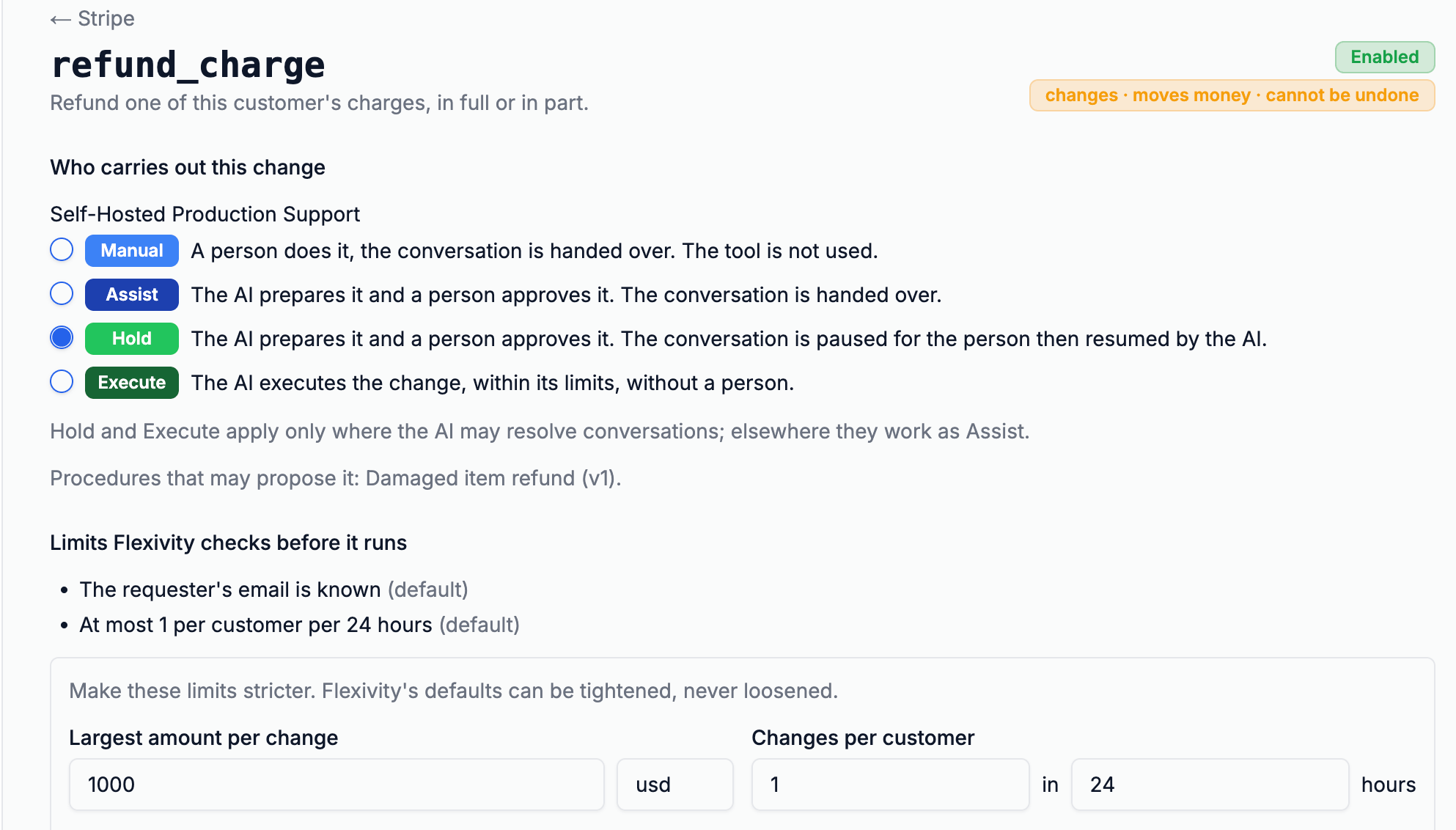
Refunds are a write operation, which means they’re governed by the full write-mode ladder: Manual (handed to a person with context), Assist (prepared on the ticket for an agent to approve), Hold (prepared while the customer waits in the conversation), or Execute (made by the AI itself, within the limits you set). Every refund the AI prepares shows up as a card on the ticket — the amount, the reason, every check that passed, and when the prepared change expires. A change that moves money needs a largest-amount-per-change threshold before the AI may make it unattended. Only an administrator can enable the Execute mode on a tool. A circuit breaker puts a person back in the loop when unattended changes run unusually.
- Five tools — find the customer, list charges, look up a charge, list invoices, refund in full or in part
- Write modes for refunds — Manual, Assist, Hold, or Execute, set per brand with per-change amount thresholds
- Checked before and when they run — the charge must come from a lookup for this customer, and limits apply before any unattended change
The point is that it’s safe, not just that it can
Most AI vendors position taking action as a headline capability — the AI can refund, cancel, update. Fewer talk about what prevents it from doing the wrong thing. Flexivity treats the controls as the capability. The write modes let you decide where the AI acts on its own and where it prepares a change for an agent. Field-level visibility means the AI sees only what you choose. Scoping to the ticket’s customer means the AI can’t be redirected to another record by its own output or a customer’s input. Amount thresholds, rate limits, and the circuit breaker catch the edge cases. The audit log records every change on the ticket.
Autonomous action is where AI makes most teams nervous, with good reason. The point of these controls is that trust is earned per tool, per brand, per class of tickets — the same philosophy that governs Progressive Autonomy for conversations, extended to the changes the AI makes in your systems.