Progressive Autonomy in practice: Setting the AI's boundary, class of tickets at a time
A closer look at the seven levels, the rules engine that puts tickets on them, and how teams promote a class up the ladder as trust is earned.

Last week we introduced Progressive Autonomy as our answer to a false choice in the AI-in-support market — the two-camp forcing function that makes teams pick between autonomous resolution they can't control and a co-pilot that can't grow into resolution when they're ready.
The framing is the argument. This post is the mechanics: what each of the seven levels actually looks like when you deploy them, how you set the level per class of tickets, and how a team's configuration evolves as trust is earned.
The seven levels, grouped by what they do
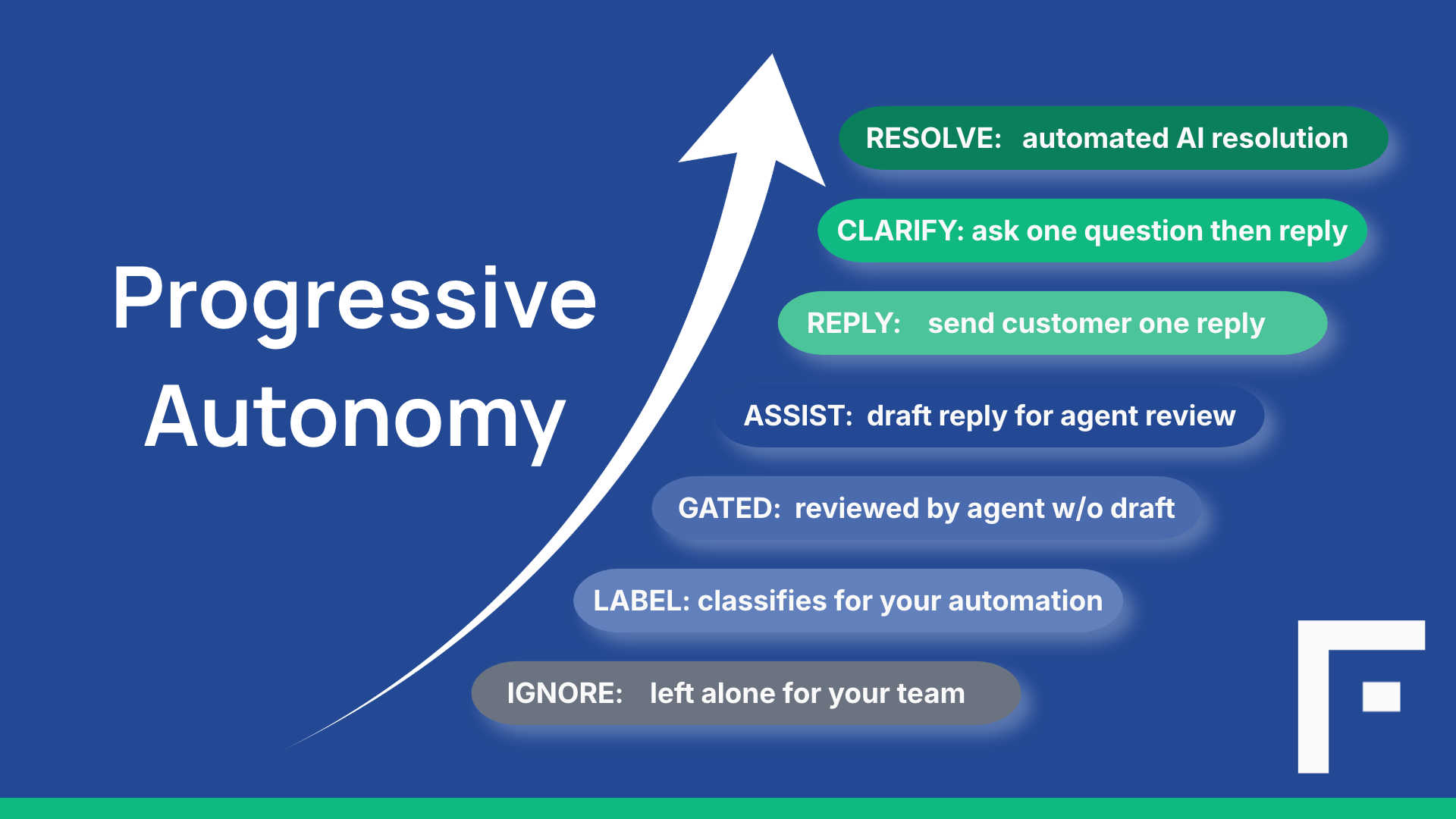
Reading the ladder as seven equal rungs misses the shape. It's more useful to think about it as three zones.
Levels 1-3 — AI in the background. The AI works on the ticket but doesn't draft a customer reply. Ignore does nothing. Label reads the ticket and sets attributes — topic, sentiment, whatever fields you've mapped — so your existing triggers and views can use them. Gated goes further: it summarizes the ticket for your agent, but explicitly withholds a draft because policy says this class needs human hands.
These aren't a compromise. They're deliberate choices for tickets where you don't want the AI drafting — sensitive matters, tickets bound by legal or compliance obligations, or classes where your team's judgment is the value being delivered.
Level 4 — Assist. The AI drafts a reply from your knowledge base. Your agent reads it, edits if needed, and decides whether to send. This is the default level for every ticket, and it's where most tickets stay in most deployments. Assist is where reviewable AI work meets human judgment — every ticket the AI processes, every draft an agent accepts, edits, or replaces, and every attribute correction gets logged, giving you the evidence you need to know where the AI is holding up and where it isn't — without ever putting an unreviewed message in front of a customer.
Levels 5-7 — AI to the customer, with escalating scope. Reply sends the customer one message directly, but if they follow up, the ticket goes to an agent. Clarify handles the case where a request is too vague to answer — the AI asks one clarifying question, then answers the response. Resolve keeps the conversation going until it's resolved, within a message limit you set, escalating to an agent if anything goes off track.
The important thing about the top three levels: they're all still grounded in your knowledge base. Every claim in every reply must cite a retrieved article, or the reply is withheld. If the AI can't find a source, the ticket escalates with the reason stated. Autonomy doesn't mean the AI makes things up when it doesn't know — it means the AI acts within a bounded scope, and hands off honestly when it hits a limit.
How you set the level: attributes and rules
The mechanism that makes Progressive Autonomy operational is a classification-and-rules engine that runs on every ticket as it arrives.
Classification. The AI reads the ticket and decides values for its attributes in one pass.
Attributes describe what kind of ticket this is. Three sources:
- Flexivity attributes are ones you define — custom labels that reflect how your business thinks about tickets ("customer tier," "product line," "billing dispute type").
- Mapped attributes are your help desk's own fields — topic, category, priority. The AI can fill these in for you, or read fields your team owns.
- System attributes are built into Flexivity — sentiment, whether an agent has replied, message count.
Rules match on attribute values and choose a level. Some examples of what real rules look like:
- Topic is "Order Status" → Resolve
- Topic is "Password Reset" → Reply
- Topic is "Billing" AND sentiment is "Frustrated" → Assist
- Topic is "Refund Dispute" → Gated
- Customer tier is "Enterprise" → Assist
Rules are set per brand, so different brands can have different treatment. When several rules match a ticket, the more specific one wins.
The result: every ticket lands at the level that matches its shape. A password reset gets answered directly. A frustrated billing question gets a draft for the agent to review. A refund dispute goes straight to a person with a summary. A ticket the rules don't specifically address lands at Assist — the default.
What a deployment looks like as it matures
A team's rule configuration is a living document. It reflects where they are in trusting the AI on each class of tickets.
Week 1 — Everything at Assist. New Flexivity deployments start with almost everything at Assist. Rules are minimal. Agents review every draft. The team watches what the AI produces, corrects attributes when they're wrong, and rates drafts thumbs up or down. Feedback and Activity Log data accumulates.
Weeks 2-4 — First promotions. A pattern emerges: order status questions get simple, correct answers from the knowledge base almost every time. The team writes a rule: Topic is Order Status → Reply. Those tickets now get answered directly. If a customer follows up, the ticket comes to the team. If the AI can't find an answer, it escalates with the reason.
The team also spots the opposite pattern: refund disputes are consistently sensitive, sometimes legally consequential, and always benefit from human judgment. They add: Topic is Refund Dispute → Gated. Those tickets now go straight to an agent with a summary — the AI doesn't draft.
Months 2-3 — Deeper autonomy for specific classes. As confidence grows, more classes move up. Password resets go to Reply. Standard shipping questions go to Resolve — the AI can hold a multi-turn conversation because there's nothing sensitive at stake. Meanwhile, some ticket classes get promoted downward: what looked like a good candidate for Reply turned out to have too many edge cases, so it moves back to Assist.
Steady state. A mature deployment has a mix across levels. The specific distribution depends on the business — a SaaS company's mix looks nothing like a physical retailer's — but the shape is a distribution, not a single choice. Some classes at Resolve. Some at Reply. Most at Assist. Some at Gated. And that mix keeps evolving as the team learns.
The important thing: none of this configuration is a project. Each rule is a setting an admin changes in a few minutes. No vendor engagement, no re-deployment, no change window. When something isn't working, you dial it back. When you learn something new about a class of tickets, you promote or demote.
Why Assist stays the default
Even in a mature deployment, most tickets — and most ticket classes — stay at Assist. That's by design.
Assist is where the AI's work is reviewable before it reaches the customer. It's where an agent can catch an edge case the classifier missed. It's where the highest-judgment tickets live, because those are the ones that benefit most from AI drafting plus human review.
It's also where the AI's performance becomes most visible. Every draft an agent uses, edits, or replaces is a data point on what's working and what isn't. Every attribute correction shows up in the analytics as a signal that a rule may need adjustment. Assist is the level where you see most clearly what the AI is doing well and where it's falling short.
The top three levels — Reply, Clarify, Resolve — are for the classes of tickets where you've done the learning and are confident enough to let the AI act. They're the payoff, not the goal. The goal is a system that lets you know, per class of tickets, which level is right — and change your mind when the data changes.
What's next
This is the first of three deep dives into how Flexivity works. Next up: AI Context — the panel your agents see when a ticket reaches them, and how it gets built from your knowledge base, ticket history, and the AI's read of the conversation. After that: Knowledge Builder — the mechanism that closes the gaps that quietly cap every AI deployment.
If you're evaluating Flexivity and want to see Progressive Autonomy running on your own tickets, book a demo or see pricing.
Documentation on the mechanics is here: Capabilities and the Progressive Autonomy user guides for Zendesk and osTicket.